Ratio Aucta (R/A) vs spreadsheets
When spreadsheets stop working for engineering project tracking
Many engineering consultancies run their projects on spreadsheets, and plenty of them do it well. A good workbook is free, flexible and familiar to everyone in the office. So this isn't about why you should throw Excel away.
It's about the point where a spreadsheet stops being a tool and starts being a job. That point usually arrives when you're running a dozen or more lump-sum or schedule-of-items jobs at once, and someone spends Friday afternoon reconciling timesheets, progress and invoices across five workbooks.
The short version: if you run a handful of projects and one person owns the numbers, a spreadsheet is probably fine. If you're asking “are we actually making money on this job?” and nobody can answer without an afternoon in Excel, it's time to look at something built for it.
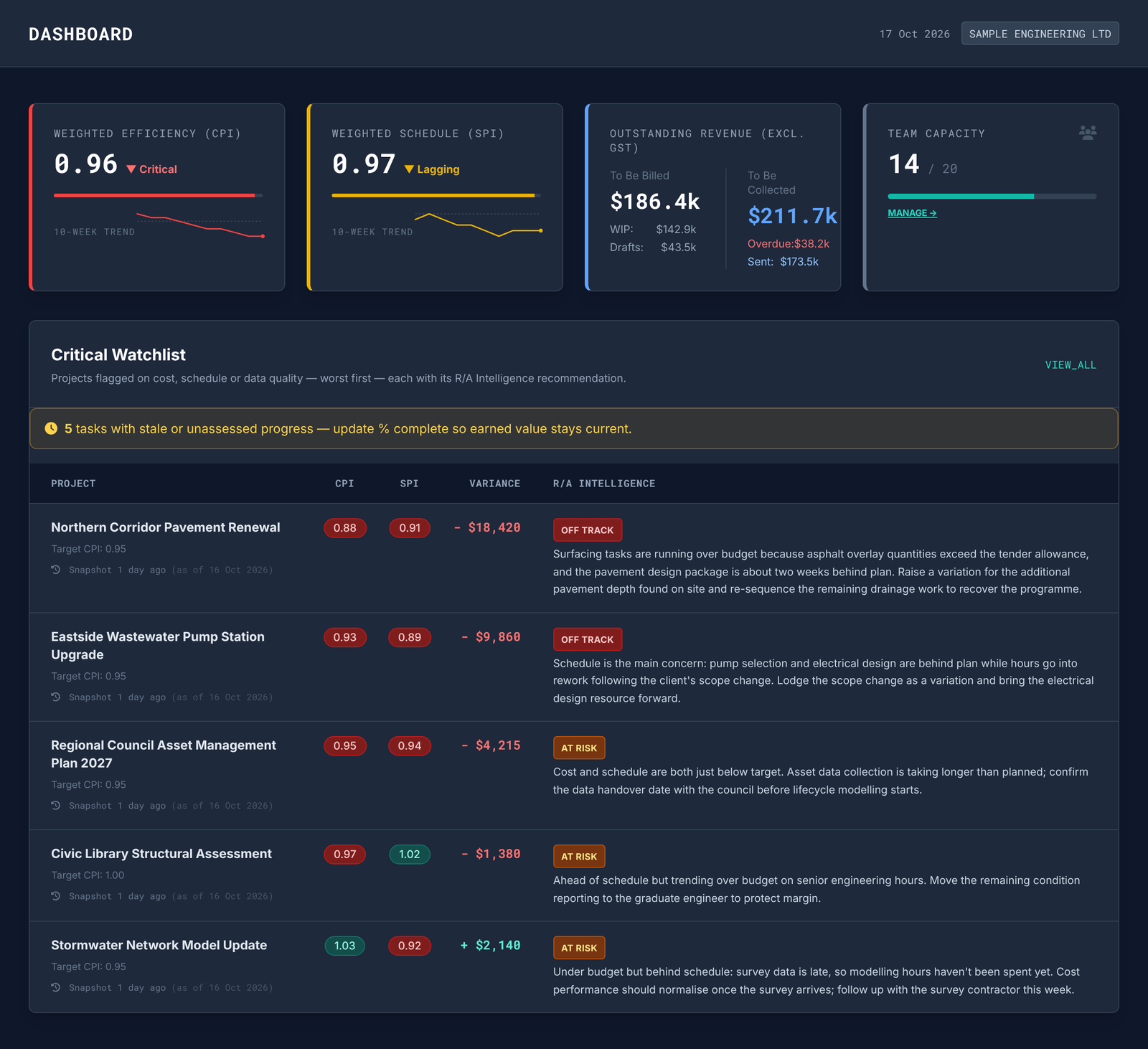
At a glance
| Item | Spreadsheets | Ratio Aucta (R/A) |
|---|---|---|
| Cost | Usually already paid for | See pricing. A 90-day free trial with full access is available, with no card and no commitment. |
| Setup | Minutes for a simple tracker; weeks to build a good one | A quick one-off setup to reflect your business: organisation settings, invoicing details, Xero integration, users, roles, permissions and rates. Add clients or sync them from Xero in one click, customise project and task lifecycle statuses, then add your first project. |
| Flexibility | Unlimited: any layout, any formula | Structured around how consultancy projects run, with a project and multiple tasks to define delivery |
| Lump-sum and schedule-of-items contracts | Possible, but you build and maintain the logic yourself | Projects and tasks are set up to match the billing type: time and materials, capped, fixed price, or progress (milestone) billing |
| Progress tracking | Manual entry, often in a separate sheet per job | Four progress methods per task: manual percent complete, units complete, weighted milestones (each with a completion criterion and evidence reference), and 0/100 or 50/50 formulas. Update reminders show in the Tasks view. |
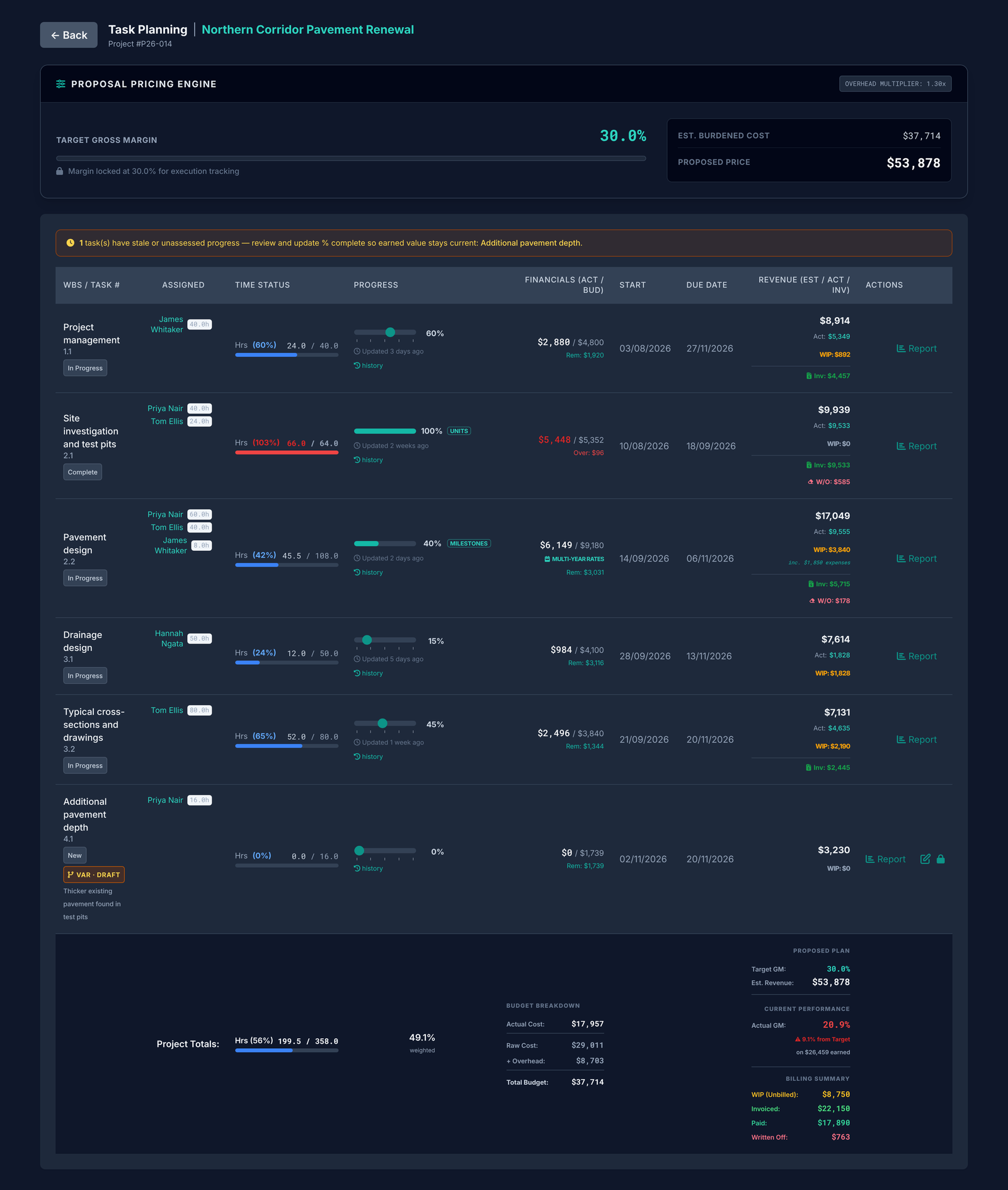
| Estimated vs actual revenue | Formulas you write and check | Real-time estimated, actual-to-date and invoiced revenue, work in progress from current timesheets, and target versus actual gross margin. Invoiced, paid, outstanding and written-off totals at task level. |
| Write-offs | Usually an adjusted cell with no history | A write-off workflow built into invoicing, at time-record level, with a mandatory reason. Write-offs flow through to project reporting as a deduction from potential revenue, and show in the WIP dashboard and the projects CSV export. |
| Multiple users | Version clashes, locked files, “final_v3” | Permissions linked to business roles. You decide who can do what and what they can see. |
| Firm-wide view | Rolling up many workbooks by hand | A permission-controlled dashboard of project earned-value performance, with the AI project manager's assessment of each project's SPI and CPI on a schedule you set. Poorly performing projects are flagged so your attention goes where it matters most. |
| Audit trail | Limited or none | Auditable timesheet records. Once a record is invoiced it can't be edited or deleted. Full reporting at task and project level. |
Where spreadsheets win
It's worth being honest about this, because spreadsheets are genuinely good at some things.
- They cost nothing extra. You already have Excel or Google Sheets.
- They bend to anything. Unusual fee structures, one-off reports, quick what-if scenarios: a spreadsheet handles them in minutes.
- Everyone knows them. No training, no new logins, no change management.
- They're fine at small scale. A sole practitioner or a three-person firm with a few active jobs may never need more.
If that describes you, keep your spreadsheet. Come back when it starts to hurt.
Where spreadsheets start to break
Spreadsheets are where almost every team starts. They're familiar, flexible and seem free. But the problems rarely show up all at once. They creep in as the number of jobs, people and contract types grows, until tracking the team's time becomes a system that nobody designed and everyone depends on.
-
It doesn't scale with the team.
One person's timesheet is simple. Ten people across twenty projects means dozens of files, or one shared workbook that people overwrite, lock or copy “just for this month”. Consolidating them becomes someone's job every week.
In R/AEveryone logs time into the same system, against the projects and tasks they're assigned to. There's nothing to collect or consolidate.
-
Rates are harder than they look.
Pay rates change on a set date, charge-out rates depend on the project's margin and overhead, some people have contracted rates on certain tasks, and overtime carries a premium. A spreadsheet uses whatever rate is in the cell today. Change a rate in March and January's figures can quietly change too, unless someone remembered to lock them.
In R/AThe correct cost and charge-out rate for the work date is calculated and locked in when the time is entered. Future rate changes don't rewrite the past.
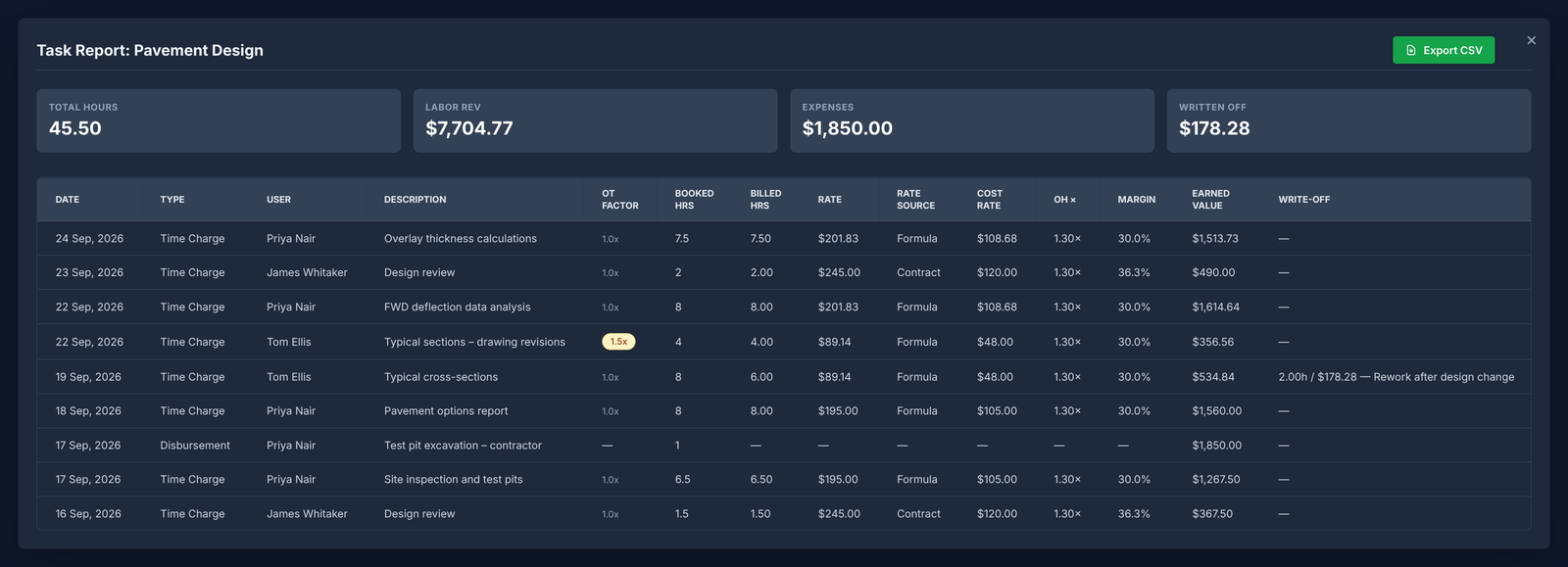
Each entry keeps the rate in force on the day it was worked. Priya's pay rate changed on 19 September, so her charge-out rate moves from $195.00 to $201.83 without touching earlier entries. Illustrative example with sample data; select the image to enlarge. -
There's no control over what gets booked.
Anyone can type any job code and any number of hours against any task, including tasks they were never assigned to or projects that have already closed. Errors turn up at invoicing, or not at all.
In R/ATime can only be booked to tasks a person is assigned to, archived projects are blocked, and an entry without a valid rate can't be saved.
-
Lump-sum margin is guesswork until the job is over.
Knowing a project has used 60% of its hours tells you nothing unless you also know whether it's 60% done. On a fixed fee, the real question is how much of the work is done against how much of the fee you've used. Spreadsheets can answer that, but only if someone keeps progress, time and fees in step by hand. In practice, the overrun shows up at the end.
In R/AThe project manager records progress each week. Estimated revenue, actual revenue at your charge-out rates, and the gap between them are calculated for every project in real time.
-
Write-offs disappear without a trace.
When a job overruns, someone adjusts a number. Six months later nobody remembers why, who approved it, or how much the firm has written off across all its projects.
In R/AWrite-offs go through a set workflow that records who, when and why. A write-off report shows the total across the firm and exports to CSV.
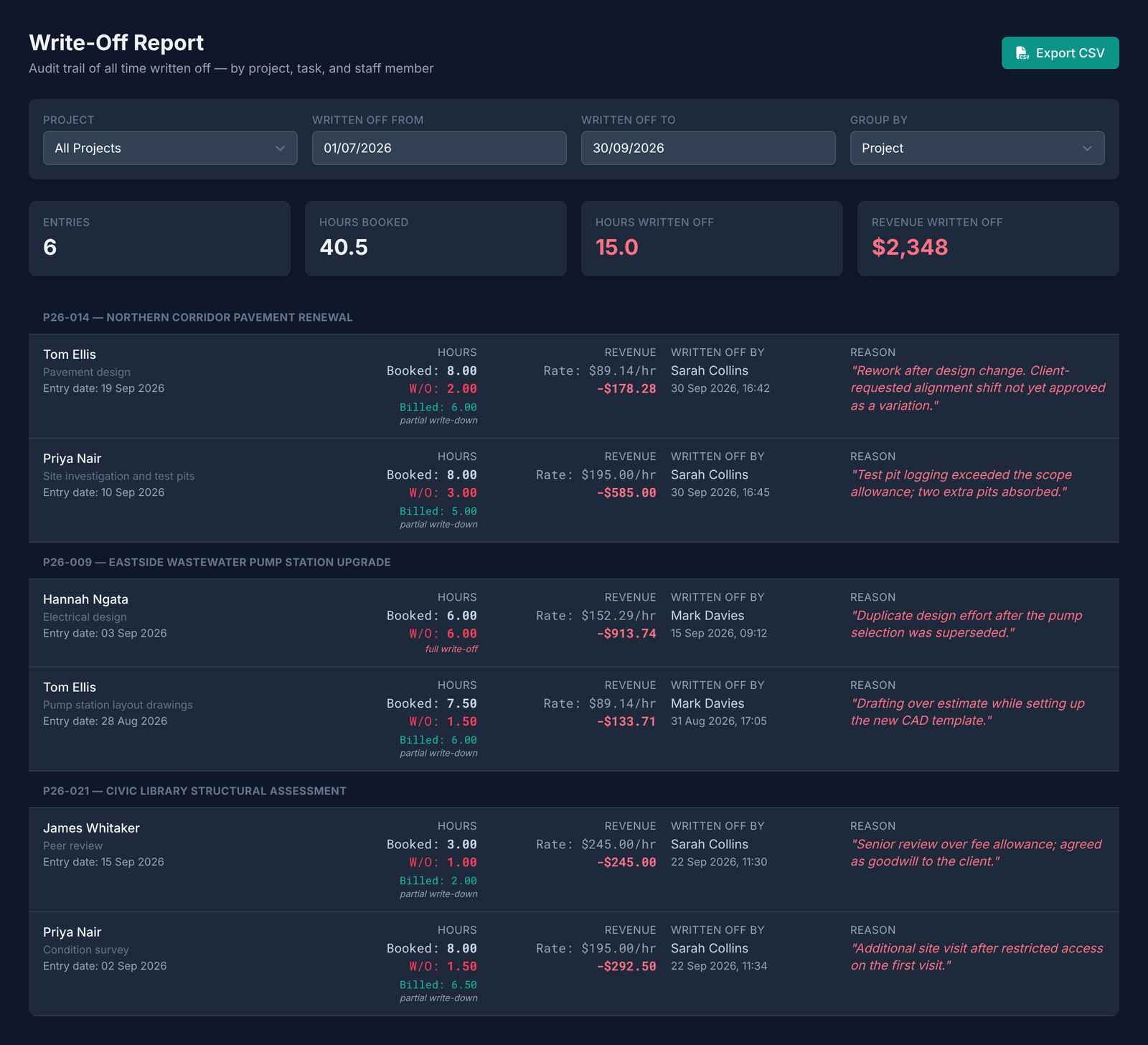
Every write-off is recorded with who, when and why, and totalled across the firm. Illustrative example with sample data; select the image to enlarge. -
Nobody trusts the version they're looking at.
Workbooks get emailed, copied and renamed, and invoices end up based on last month's file. Meanwhile formulas break quietly: a pasted row, a deleted column or a range that doesn't extend to the new month, and the totals are wrong with no warning. Spreadsheet errors are common and often go unnoticed, and every one of them flows straight into what you bill.
In R/AThere's one version of the truth and one set of numbers, calculated by the system rather than by hand-built formulas, and everyone logs in to the same place.
-
The firm-wide view takes a day to build, and is out of date when it's done.
Answering “which jobs are losing money right now?” means collecting timesheets, opening every workbook and rolling them up. By then the reporting period has ended, and overruns are found after they've happened, when they're expensive to fix.
In R/AThe AI project manager monitors burn rate and efficiency (CPI and SPI), flags risks early and recommends actions to bring each project back on track. The dashboard ranks projects worst first, so your attention goes where it has the most impact.
-
It all depends on one person.
Most spreadsheet systems rely on one person who understands how everything fits together. When they're busy, on leave or leave the firm, the system goes with them.
In R/AThe rules for rates, progress, write-offs and invoicing are built into the system, not locked inside someone's formulas.
One source of truth. R/A replaces the spreadsheets with a single connected system. Time is captured against assigned tasks at the right rate, progress and cost update together, and the numbers flow straight through to invoicing and your accounting system.
Which should you choose?
Stay with spreadsheets if
- you have fewer than about five active projects
- your work is mostly time and materials, billed on hours
- one person owns all the numbers and has time to maintain them
Look at R/A if
- you run lump-sum or schedule-of-items contracts and need to see margin before the job ends
- several project managers update the same numbers
- write-offs and overruns need to be visible and accountable
- month-end reporting takes more than an hour or two
- you want invoices built from approved time, write-offs and disbursements, synced to Xero in one click
Something bigger may suit you if you need full accounting, payroll or resource scheduling in one system across 100+ staff. A larger ERP-style platform may be the better fit, and we'd rather tell you that now.
Moving off spreadsheets
You don't need to migrate your history. Most firms start with live jobs only and leave closed projects in their old workbooks.
- Pick two or three active projects with a mix of contract types.
- Set them up in R/A: fee, contract type, team and charge-out rates. Allow about an hour per project, depending on its complexity and number of tasks. Tasks can be pasted straight in from a spreadsheet.
- Run both side by side for a month. Keep the spreadsheet as a check while the project manager records weekly progress in R/A.
- Compare month-end. If the numbers match and reporting took less time, move the rest of your live jobs across.
Why we built R/A
After 30 years delivering engineering and asset management projects, we kept seeing the same problem: by the time we knew a project was in trouble, the damage was already done. The data was siloed across timesheets, spreadsheets and accounts. R/A brings it into one place, linked to your accounting system, with an AI project manager that flags drift early and suggests ways to recover, so you can focus where it counts.
Marius van Niekerk · Founder, Ratio Aucta
Try it on a live project
Set up one real job and see your margin by the end of the week. 90 days free with full access, and no card required.